Published
- 7 min read
Deploy OpenClaw (formerly Moltbot, formerly Clawdbot) Securely on Cloudflare

The dream of the “Personal AI Agent” is here. Projects like Clawdbot (recently renamed Moltbot, and now OpenClaw) promise an assistant that can browse the web, write code, and manage your life. The internet’s reaction? Buying Mac Minis to run these AI agents 24/7 at home.
But there is a massive security problem: Running an autonomous AI agent with shell execution capabilities on your local network or personal device is a recipe for disaster. One successful prompt injection, and that helpful assistant could rm -rf your documents or exfiltrate your SSH keys.
Moltworker is a reference implementation that moves OpenClaw off your hardware and into Cloudflare’s secure infrastructure. By leveraging Cloudflare Sandboxes and Zero Trust, you can run a powerful agent without the risk of local Remote Code Execution (RCE).
Here is a deep dive into the architecture and a step-by-step guide to deploying OpenClaw safely.
What to Remember
- Local Risks: Running autonomous agents on local hardware creates significant RCE and data exfiltration risks via prompt injection.
- Sandboxing: Moltworker isolates agent execution in Cloudflare Sandboxes (micro-VMs), preventing access to local networks.
- Persistence: State and history are stored in Cloudflare R2, ensuring data retention despite the ephemeral nature of sandboxes.
- Zero Trust: The Admin UI is protected by Cloudflare Access, ensuring only authenticated users can control the agent.
Why “Hosting” OpenClaw (formerly Moltbot, formerly Clawdbot) on VPS is Dangerous ?
The core feature of agents like OpenClaw is their ability to use tools. While a VPS offers 24/7 “persistence,” a VPS moves your AI agent from a private network to a public-facing battlefield.
- Public IP Exposure: Unlike a home computer behind a router, a VPS has a public IP. If you misconfigure the gateway, you are handing a terminal-access “god-mode” bot to every automated scanner on the internet.
- The “Lethal” RCE Vulnerability: Recent exploits (like CVE-2026-25253) allow attackers to hijack the Control UI. Since the OpenClaw bot is already hosted on a high-bandwidth server, an attacker can instantly turn your VPS into a botnet node or crypto-miner.
- API Key “Honey Pots”: OpenClaw stores sensitive API keys (OpenAI, Anthropic, etc.) on the server. If the VPS is compromised via a community “skill” or a prompt injection, these API keys are easily exfiltrated, leading to massive billing spikes.
- Indirect Prompt Injection: Because the OpenClaw bot is “always on” and often connected to live feeds (Email, Telegram), an attacker can send a message that tricks the OpenClaw agent into running
rm -rfor uploading your.sshdirectory to a remote server. - Pivot Attacks: A VPS is rarely an island. If you use the same credentials for your VPS as you do for your cloud provider, a compromised OpenClaw instance can be used to “pivot” and compromise your entire infrastructure.
Note: If you don’t have a strong security background, it is highly recommended to deploy using Cloudflare Tunnels (Zero Trust) or keep the OpenClaw agent 100% local with no external connections.
The Solution: Cloudflare’s Isolation Architecture
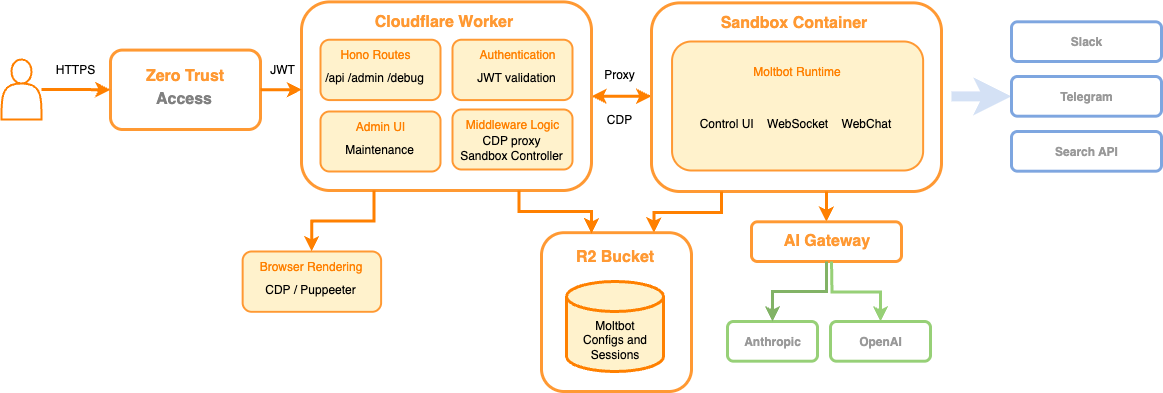
Figure: Moltworker architecture diagram showing how OpenClaw agents run in isolated Cloudflare Sandboxes with R2 storage for persistence, Browser Rendering for web browsing, and Zero Trust protection for the Admin UI.
Moltworker solves these security issues by decoupling the “Brain” from the “Execution Environment.”
1. The Sandbox (The Cell)
Instead of running on a server, the OpenClaw agent’s logic runs inside a Cloudflare Sandbox. This is an isolated, ephemeral micro-VM.
- If the OpenClaw agent goes rogue or is hijacked, the agent is trapped inside a temporary container that dies when the task is done.
- The sandbox has no access to your local network or files.
2. R2 Storage (The Memory)
Since Sandboxes are ephemeral, how does the OpenClaw agent remember you? Moltworker uses Cloudflare R2 (object storage) to persist configuration, chat history, and sessions. The container mounts the R2 bucket as a filesystem on startup, giving the illusion of permanence without the risk of a persistent OS.
3. Browser Rendering (The Eyes)
Instead of running a heavy Puppeteer instance locally, OpenClaw offloads web browsing to Cloudflare Browser Rendering. This prevents “browser escape” attacks and keeps the heavy lifting off the compute worker.
4. Zero Trust (The Gatekeeper)
The Admin UI and API are hidden behind Cloudflare Access. There are no open ports. You authenticate via your Identity Provider (Google, GitHub, etc.) before you can even talk to the OpenClaw agent.
Tutorial: Deploying OpenClaw with Moltworker
Prerequisites:
- A Cloudflare Account (Workers Paid plan required for Sandboxes - ~$5/mo).
- An Anthropic API Key (or AI Gateway setup).
- Node.js and npm installed.
Step 1: Setup the Repository
Clone the repository and install dependencies.
       git clone https://github.com/cloudflare/moltworker.git
cd moltworker
npm install
Step 2: Configure Secrets
You need to tell the Moltworker how to authenticate with the AI provider. Using Cloudflare AI Gateway is recommended for caching and logging, but direct keys work too.
       # Set your Anthropic Key
npx wrangler secret put ANTHROPIC_API_KEY

# Generate a secure gateway token (used for device pairing)
export TOKEN=$(openssl rand -hex 32)
echo "Your Token: $TOKEN"
echo "$TOKEN" | npx wrangler secret put MOLTBOT_GATEWAY_TOKEN
Step 3: Deploy the Worker
Deploy the infrastructure to Cloudflare’s edge.
npm run deployNote: The first request might take 1-2 minutes as the Sandbox container spins up.
Step 4: Secure the Admin UI (Critical)
By default, the Admin UI is exposed but requires a token. To make the Admin UI truly secure, wrap it in Cloudflare Access.
- Go to the Cloudflare Dashboard -> Workers & Pages.
- Select your
moltbot-sandboxworker -> Settings -> Trigger. - Click “Enable Cloudflare Access”.
- Add your email address to the allowlist.
- Important: Copy the “Audience Tag” (AUD) from the Access settings.
- Set the AUD secret in your Moltworker so the Moltworker can validate the JWTs:
       npx wrangler secret put CF_ACCESS_AUD
npx wrangler secret put CF_ACCESS_TEAM_DOMAIN # e.g., myteam.cloudflareaccess.com
npm run deploy
Step 5: Enable Persistence (R2)
To stop your OpenClaw agent from having amnesia every time it restarts:
- Create an R2 Bucket in the dashboard named
moltbot-data. - Create R2 API tokens (Edit/Write permissions).
- Add the API tokens to the Moltworker:
       npx wrangler secret put R2_ACCESS_KEY_ID
npx wrangler secret put R2_SECRET_ACCESS_KEY
npx wrangler secret put CF_ACCOUNT_ID
Conclusion: The Future of Self-Hosted AI
As you consider deploying OpenClaw, understanding the security implications discussed in Clawdbot Security: How an AI Agent Could Leave Your Front Door Unlocked is essential. This awareness will help you implement the necessary precautions to protect your OpenClaw AI agent.
Moltworker proves that “Self-Hosted” doesn’t have to mean “Running on my Gaming PC.” By moving OpenClaw to the edge, you get the best of both worlds: total data ownership (your keys, your R2 bucket) with enterprise-grade security (Sandboxing, Zero Trust).
This architecture effectively neutralizes the RCE threat associated with autonomous OpenClaw agents, making it safe to finally let the AI take the wheel.
To further enhance your cloud security and AI agent security, contact me on LinkedIn or contact@ogw.fr.
Frequently Asked Questions (FAQ)
What is OpenClaw (formerly Moltbot, formerly Clawdbot)?
OpenClaw (formerly Moltbot/Clawdbot) is a personal AI agent assistant capable of browsing the web, writing code, and managing tasks, often self-hosted by users.
Why is running AI agents locally dangerous?
Running autonomous agents locally can grant them user privileges, making your device vulnerable to Remote Code Execution (RCE) attacks via prompt injection from malicious websites.
How does Moltworker improve security?
Moltworker moves the agent's execution into ephemeral Cloudflare Sandboxes (micro-VMs), isolating the logic from your local network and preventing persistent damage.
What is the role of Cloudflare R2 in this setup?
Since sandboxes are temporary, Cloudflare R2 serves as the persistent memory layer, storing configuration, chat history, and sessions securely.
How do I secure the Admin UI?
You should wrap the Admin UI in Cloudflare Access (Zero Trust), requiring authentication via an Identity Provider before anyone can access the agent's interface.
Resources
- Moltworker GitHub Repository: https://github.com/cloudflare/moltworker
- OpenClaw Project: The underlying open-source agent (formerly Moltbot/Clawdbot).
- Cloudflare Workers: Documentation on the serverless platform.
- Anthropic Claude: The AI model powering the agent’s logic.
