Published
- 7 min read
Securing Model Context Protocol (MCP) Authentication: Best Practices

As AI agents move from experimental toys to enterprise tools, the Model Context Protocol (MCP) has emerged as the standard connective tissue. It allows LLMs to reach out and touch the real world querying databases, managing infrastructure, and accessing sensitive documents. But with great power comes a massive attack surface.
If an MCP server is the gateway to your data, authentication is the lock. A weak implementation doesn’t just break the agent; it compromises the entire backend infrastructure. From “Confused Deputy” attacks to session hijacking, the risks are real and sophisticated.
Based on the latest security research and the official MCP best practices, this guide dissects how to properly secure your MCP connections. We will move beyond basic API keys and explore enterprise-grade authentication strategies that keep your agents secure and your data private.
What to Remember
- No Token Passthrough: Never let clients send raw downstream tokens to the MCP server. It breaks audit trails and security boundaries.
- Beware the Confused Deputy: Use dynamic client registration with user consent to prevent attackers from tricking users into authorizing malicious clients.
- Session IDs are Critical: Bind session IDs to user identities (
user_id:session_id) to prevent impersonation and hijacking. - Context Matters: Choose your auth method based on the environment Static Headers for simple APIs, OAuth for third-party apps, and Service Account Impersonation for high-security internal tools.
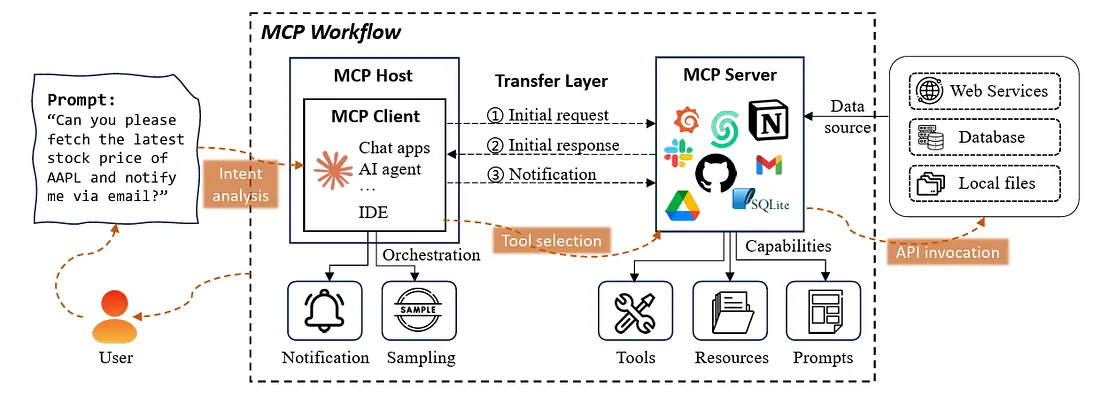 source: TONI RAMCHANDANI, Model Context Protocol (MCP) Security Measures, medium
Understanding MCP Authentication Risks
1. The “Confused Deputy” Problem: A Silent Killer
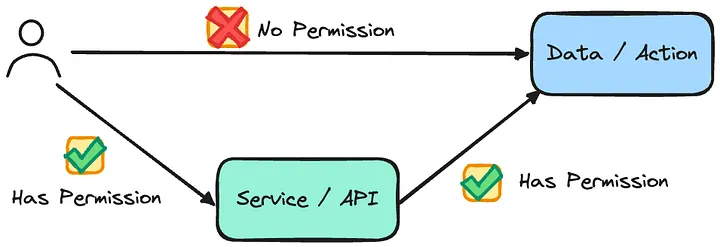
One of the most dangerous vulnerabilities in protocol design is the “Confused Deputy.” In the context of MCP, this happens when an MCP server acts as a proxy for a third-party API (like Google Drive or GitHub).
The Attack Scenario:
- An attacker creates a malicious MCP client.
- They trick a victim into clicking a link that initiates an OAuth flow.
- Because the MCP server uses a static client ID for all users, the third-party provider (e.g., GitHub) sees a valid request from a “trusted” app (the MCP server) and might skip the consent screen if the user has authorized it before.
- The authorization code is redirected to the attacker, who can now impersonate the victim on the MCP server.
The Fix:
- Dynamic Client Registration: If the downstream provider supports it, register a unique client for every new connection.
- Explicit Consent: The MCP server must force a user consent screen for every new dynamic client connection, ensuring the user knows exactly who is requesting access.
2. The “Token Passthrough” Anti-Pattern

Developers love shortcuts, and “Token Passthrough” is the deadliest one in MCP. This occurs when an MCP client sends a raw access token (e.g., a GitHub PAT) directly to the MCP server, which then blindly uses it to call the downstream API.
Why it is dangerous:
- Broken Audit Trails: The downstream service sees the request coming from the token owner, not the MCP server. You lose the ability to trace which agent made the call.
- Blast Radius: If the MCP server is compromised, the attacker steals a token that works directly against the downstream API, bypassing any MCP-specific guardrails.
- Privilege Escalation: A user might pass a token with
adminscope to an agent that only needsreadaccess.
The Fix: The MCP server must be the system of record. Clients should authenticate to the MCP server (using MCP-specific credentials). The MCP server should then use its own managed credentials (or a securely stored refresh token) to talk to the downstream service.
3. Session Hijacking in MCP
/filters:no_upscale()/news/2025/10/google-cloud-secure-mcp/en/resources/13_keGFZdt.max-2000x2000-1759937163743.png)
Since MCP often involves long-running sessions or asynchronous events (like an agent waiting for a long task to finish), session management is a prime target.
The Attack Scenario: An attacker guesses or steals a session ID. They can then:
- Impersonate the Client: Make calls to the MCP server as if they were the legitimate user.
- Inject Malicious Events: Send fake “task complete” events to the client, tricking the agent into processing malicious data (Prompt Injection).
The Fix:
- Bind Sessions to Identity: Never use a naked Session ID. Bind it cryptographically to the user’s identity (e.g., a hash of
UserID + SessionID). Even if an attacker steals the ID, they cannot use it without the corresponding user authentication. - Secure Transport: Always use HTTPS/TLS 1.2+. This seems obvious, but internal tools often skip it. In MCP, where agents read database schemas and codebases, plain text is suicide.
Choosing the Right Auth Strategy (A Practical Guide)
Not all MCP connections need the same level of security. Here is a breakdown of when to use what, based on Google Cloud:
Level 1: Static HTTP Headers (API Keys)
- Best for: Simple, read-only tools or public APIs (e.g., a Weather agent).
- Risk: Keys are often stored in plain text config files. If the laptop is stolen, the key is gone.
- Implementation:
Authorization: Bearer <KEY>in the MCP client config.
Level 2: OAuth 2.0
- Best for: Third-party integrations (Linear, Slack, GitHub) where the agent acts on behalf of a human user.
- Benefit: Tokens are short-lived and can be refreshed automatically. Scope is limited by the provider.
Level 3: Google Credentials / ADC
- Best for: Internal enterprise tools on Google Cloud.
- Benefit: Uses Application Default Credentials (ADC). Tokens are short-lived, managed by the CLI (
gcloud auth), and tied to the developer’s corporate identity. No long-lived secrets are stored on disk.
Level 4: Service Account Impersonation (The Gold Standard)
- Best for: High-risk production agents or automated pipelines.
- How it works: The human user authenticates, but the Agent impersonates a specific machine Service Account with strictly defined permissions (Least Privilege).
- Benefit: Even if the user is an Admin, the Agent can only do what the Service Account allows (e.g., “Read Only” on BigQuery). This limits the blast radius of a rogue agent.
Bonus : Google Cloud Security Architecture for MCP
The diagram below illustrates a recommended reference architecture for securing MCP deployments on Google Cloud

Conclusion: Security is Context
MCP is rewriting the rules of how AI interacts with infrastructure. By treating MCP servers not just as “pipes” but as critical security boundaries, you can deploy powerful agents without handing them the keys to the kingdom.
Start by auditing your current MCP implementations. Are you passing raw tokens? Are your session IDs guessable? Fix the foundation now, before your agent becomes the attacker.
To further enhance your cloud security and implement Zero Trust, contact me on LinkedIn Profile or contact@ogw.fr
Frequently Asked Questions (FAQ)
What is the "Confused Deputy" problem in MCP?
It occurs when an MCP server uses a static identity to access a downstream service. An attacker can trick the server into performing actions on their behalf because the downstream service cannot distinguish between the attacker's request and a legitimate user's request.
Why is "Token Passthrough" banned in MCP security best practices?
Passing raw downstream tokens (like a GitHub PAT) from the client to the MCP server bypasses security controls, breaks audit trails (you can't see which agent made the call), and increases the risk if the token is stolen.
How should I secure an internal MCP server?
For internal tools, avoid static API keys. Use infrastructure-native identity like **Application Default Credentials (ADC)** on Google Cloud or AWS IAM Roles. This ensures credentials are short-lived and tied to a managed identity.
Can I use HTTP for local MCP servers?
Technically yes, but it is discouraged. Even local traffic can be sniffed by malware on the same machine. Best practice is to use `stdio` transport for local processes or HTTPS for anything over a network, even a private one.
What is Service Account Impersonation?
It is a security practice where a user (or agent) temporarily assumes the identity of a Service Account with limited permissions. This ensures the agent only has the exact rights needed for the task, rather than inheriting the broad permissions of the human user.
Resources
- Official MCP Security Best Practices: Model Context Protocol Documentation
- Wiz AI Security Guide: Model Context Protocol Security Explained
- Gemini CLI Authentication: Choosing the Right MCP Authentication
