
In the expansive world of Google Cloud Platform (GCP), networking is the nervous system that keeps your applications alive. Yet, for many architects and engineers, navigating the acronym-heavy landscape of connectivity options can feel like deciphering a secret code. Three terms, in particular, cause the most confusion: Private Service Access (PSA), Private Service Connect (PSC), and Private Google Access (PGA).
If you have ever found yourself staring at a VPC architecture diagram wondering which “Private” solution to use to connect your GKE cluster to Cloud SQL, or how to reach a storage bucket without a public IP, you are not alone. While PSA, PSC, and PGA sound similar, these three technologies solve fundamentally different problems regarding how traffic moves between your Virtual Private Cloud (VPC), Google’s managed services, and the public internet.
This comprehensive guide will strip away the complexity. The guide will dissect each technology using real-world analogies and deep technical dives, ensuring you never confuse PSA, PSC, or PGA again.
What to Remember
- PGA (Private Google Access): Private Google Access is for accessing public Google APIs (like GCS, Pub/Sub, BigQuery) from VMs that do not have external IP addresses. Private Google Access keeps traffic on Google’s backbone.
- PSA (Private Service Access): Private Service Access relies on VPC Peering. Private Service Access connects your VPC to a Google-managed VPC (for services like Cloud SQL or Redis). Private Service Access requires reserving a global IP range and can have transitive routing limitations.
- PSC (Private Service Connect): Private Service Connect is service-centric, not network-centric. Private Service Connect uses endpoints (internal IPs) in your VPC to access services. Private Service Connect eliminates IP overlap issues and is the modern standard for accessing both Google services and third-party SaaS.
- The “VPC Peering” Limit: If you use PSA, you are peering. If you use PSC, you are tunneling to an endpoint. This distinction between peering and tunneling is crucial for network scalability and transitivity.
1. Private Service Access (PSA): The Peering Bridge

Figure: Private Service Access (PSA) diagram showing VPC peering connection between consumer VPC and Google’s service producer VPC for Cloud SQL access.
Private Service Access (PSA) is the “classic” way to connect your infrastructure to managed Google services that run inside Google’s own tenant projects, such as Cloud SQL, Memorystore (Redis), and AI Platform Training.
The Technical Mechanics: VPC Network Peering
At its core, Private Service Access is an abstraction over VPC Network Peering. When you provision a managed service like Cloud SQL with a private IP, the Cloud SQL database doesn’t actually live inside your VPC. The Cloud SQL database lives in a “Service Producer VPC” managed by Google.
To allow your VMs to talk to the Cloud SQL database, Private Service Access builds a bridge (peering) between your network and Google’s network.
How Private Service Access works:
- IP Allocation: You must reserve a specific range of IP addresses (CIDR block) within your VPC (e.g.,
10.50.0.0/16) specifically for the Private Service Access connection. - Service Networking API: You use the Service Networking API to create a private connection. Google takes your reserved range and assigns it to the managed services in the Producer VPC.
- Route Exchange: Through the magic of VPC peering, routes are exchanged. Your VPC learns how to reach the Service Producer VPC, and the Service Producer VPC learns how to reach your VPC.
The Analogy: The Shared Amenities Floor
Private Service Access is like the building manager creating a shared hallway that connects your apartment directly to the Gym. To make this work, you have to reserve a specific “floor” (IP Range) in your building plans so the Gym fits. Once built, anyone in your apartment can walk down the hallway to the Gym.
The Limitations (Why we need more)
While Private Service Access is powerful, Private Service Access comes with the inherent baggage of VPC Peering:
- Non-Transitive: If VPC A is peered with VPC B (the service), and VPC A is also peered with VPC C, VPC C cannot reach VPC B. You can’t chain connections easily.
- IP Overlaps: Since you are peering networks, you cannot have overlapping IP ranges. If your organization acquires another company with the same IP scheme, Private Service Access can become a nightmare to integrate.
- Broad Access: Peering opens a network path. While firewall rules help, from a networking perspective, you are connecting two broad networks rather than exposing a single specific service.
2. Private Service Connect (PSC): The Surgical Link

Figure: Private Service Connect (PSC) diagram showing endpoints in consumer VPC connecting to service attachments in producer VPC without network peering.
Private Service Connect (PSC) is the modern evolution of private connectivity. Private Service Connect moves away from the “network-centric” model of peering and embraces a “service-centric” model. Private Service Connect allows you to access Google APIs, managed services, and even third-party SaaS applications privately, without the headaches of peering.
The Technical Mechanics: Endpoints and Attachments
Private Service Connect does not peer networks. Instead, Private Service Connect places a specific Endpoint (a forwarding rule with an internal IP address) directly inside your subnet.
How Private Service Connect works:
- No Reserved Ranges: Private Service Connect doesn’t need to reserve a massive
/16block. Private Service Connect just picks a single IP address from your existing subnet. - Service Attachment: The Service Producer (Google or a SaaS vendor) creates a “Service Attachment” that exposes their service behind a load balancer.
- Unilateral Connection: You create a Private Service Connect Endpoint in your VPC that points to that Service Attachment. Traffic sent to the Private Service Connect local IP is encapsulated and tunneled over Google’s backbone directly to the service.
The Analogy: The Private Delivery Chute
Let’s go back to the apartment building. Instead of building a hallway (peering) to the Gym, Private Service Connect is like installing a teleporter or a dedicated delivery chute inside your living room.
You press a button (send traffic to the Private Service Connect IP), and your request is instantly transported to the service. You don’t care where the service is located, or if the service provider uses the same floor plan (IP range) as you. Private Service Connect creates a private, secure, one-way door specifically for that service.
Why Private Service Connect is often superior
- Solves IP Overlap: Since there is no peering, the Producer VPC can use the exact same IP ranges as your Consumer VPC without conflict.
- Granular Security: You aren’t connecting networks; you are connecting to a specific service.
- Transitivity: Private Service Connect enables scenarios that peering prevents. For example, through Private Service Connect Interfaces, traffic can be routed in ways that traditional peering blocks, enabling hub-and-spoke topologies.
- Multi-Team/SaaS: It is the standard way to consume software from partners (like MongoDB Atlas or Snowflake) securely over GCP.
3. Private Google Access (PGA): The Hidden Tunnel to Public APIs
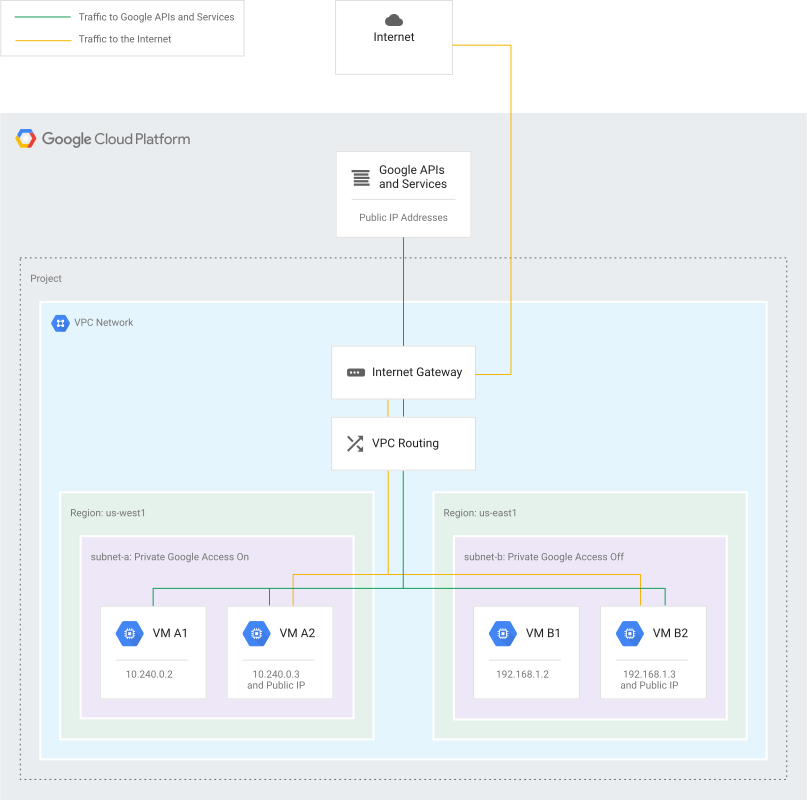
Figure: Private Google Access (PGA) diagram showing private VM routing traffic to Google public APIs through Google’s internal network without public internet access.
Private Google Access (PGA) is the most distinct of the three because Private Google Access deals with Public Google APIs.
Many Google services, like Cloud Storage (GCS), BigQuery, and Pub/Sub, are technically “public” services they are accessed via public endpoints (e.g., storage.googleapis.com). Typically, to reach these public Google APIs, a VM needs an external (public) IP address and internet access.
But what if you have a secure, private VM with no external IP? How does the private VM dump logs to Cloud Storage? This is where Private Google Access comes in.
The Technical Mechanics: The Subnet Flag
Private Google Access is a setting you enable on a Subnet level.
How Private Google Access works:
- No External IP Needed: The private VM has only a private IP (e.g.,
10.0.0.5). - Internal Routing: When the private VM tries to reach
storage.googleapis.com, usually, that traffic would be dropped because the private VM has no route to the internet. - The Magic: With Private Google Access enabled, Google’s software-defined network recognizes the destination is a Google API. Google’s software-defined network intercepts that traffic and routes it internally across Google’s backbone to the service, bypassing the public internet entirely.
The Analogy: The Secure Mailbox
Private Google Access is like having a secure mailbox inside your apartment building lobby. Even if you are grounded and not allowed to leave the building (no public IP/internet access), you can still drop a letter in this mailbox. The building manager (Google) guarantees that this letter will get to the Post Office (Google APIs) without ever traveling on the public streets (Public Internet).
Crucial Distinction: Private Google Access allows you to reach public IP addresses of Google services using private VM instances. Private Google Access does not give the Google service a private IP (that’s what Private Service Connect is for).
Comparison Summary: Which One Do I Choose?
Here is the decision matrix to simplify your architecture planning:
| Feature | Private Service Access (PSA) | Private Service Connect (PSC) | Private Google Access (PGA) |
|---|---|---|---|
| Primary Use Case | Native managed services (Cloud SQL, Memorystore). | Accessing services (Google, SaaS, or internal) via a local private IP. | Accessing Public Google APIs (GCS, BigQuery) from private VMs. |
| Mechanism | VPC Network Peering. | Forwarding Rules & Service Attachments. | Subnet-level routing feature. |
| IP Requirements | Requires reserving a dedicated IP Range (e.g., /16 or /24). | Uses a single IP from your existing subnet. | No specific IP reqs; uses Google’s public ranges internally. |
| Transitivity | No (Peering is non-transitive). | Yes (via PSC Interfaces/Endpoints). | N/A (One-way access to APIs). |
| IP Overlap | Critical Issue: Ranges cannot overlap. | Solved: Overlapping IPs are allowed. | N/A. |
| Implementation | ”Heavy” (Connecting networks). | ”Light” (Connecting endpoints). | ”Toggle” (Enable on subnet). |
Real-World Scenario: Putting all three technologies together
Imagine a complex enterprise application:
- The Database: You have a Cloud SQL instance. You use Private Service Access (PSA) to connect your VPC to the Cloud SQL instance because Private Service Access is the standard, native integration for Cloud SQL (though Cloud SQL now supports Private Service Connect, Private Service Access remains common for legacy reasons).
- The SaaS Vendor: Your application needs to send data to a third-party fraud detection SaaS running on GCP. You use Private Service Connect (PSC) to create an endpoint in your VPC so you can securely send data to the SaaS vendor without peering networks.
- The Archive: Your private application servers need to archive logs to a Google Cloud Storage bucket. Since these private application servers have no public IPs for security, you enable Private Google Access (PGA) on their subnet so the private application servers can upload files securely.
Conclusion: Choose GCP PSA, PSC, or PGA Based on Your Private Connectivity Requirements
Cloud networking is about choosing the right tool for the specific communication path.
- Use Private Service Access (PSA) when you need broad, peered access to managed services like Cloud SQL, provided you have the IP space.
- Use Private Service Connect (PSC) for a more modern, secure, and flexible connection to services (including Google’s) that avoids IP conflicts and peering headaches.
- Use Private Google Access (PGA) simply to let your private VMs talk to the vast world of Google’s public APIs without exposing them to the internet.
By mastering Private Service Access, Private Service Connect, and Private Google Access, you move from “making it work” to designing architectures that are robust, secure, and scalable.
To further enhance your cloud security and GCP networking, contact me on LinkedIn or contact@ogw.fr.
Relevant Resource List
- Google Cloud Documentation - Private Service Access: https://docs.cloud.google.com/vpc/docs/private-services-access
- Google Cloud Documentation - Private Service Connect: https://docs.cloud.google.com/vpc/docs/private-service-connect
- Google Cloud Documentation - Private Google Access: https://docs.cloud.google.com/vpc/docs/private-google-access
- Medium Article Reference: Private Service Access (PSA) vs Private Service Connect (PSC) vs Private Google Access (PGA) Made simple by Rohan Singh.
Frequently Asked Questions (FAQ)
Can I use Private Service Connect (PSC) to access Cloud SQL instead of Private Service Access (PSA)?
Yes, Cloud SQL now supports Private Service Connect. Private Service Connect is often preferred for new deployments because Private Service Connect avoids the need to reserve large IP ranges and prevents IP overlap issues, which are common with the traditional Private Service Access peering method.
Does Private Google Access (PGA) give my VM a public IP address?
No. Private Google Access allows VMs with only private IP addresses to reach the public IP addresses of Google APIs and services. The traffic remains on Google's private network backbone and never traverses the public internet.
What happens if my Private Service Access IP range overlaps with a new VPC I need to peer with?
An IP range overlap will cause a routing conflict, and the peering will fail or routing will break. IP range overlap is the main limitation of Private Service Access. To fix the IP range overlap, you would typically have to migrate your infrastructure to a non-overlapping range or switch to using Private Service Connect (PSC), which handles overlaps gracefully.
Is Private Service Connect (PSC) transitive?
Standard VPC peering is not transitive. However, Private Service Connect can enable transitive-like behaviors. For example, using Private Service Connect Interfaces allows a Producer VPC to initiate connections to a Consumer VPC, and Private Service Connect Endpoints can be accessed from peered networks if configured correctly with custom routes.
Do I need to enable Private Google Access if I have Cloud NAT?
Technically, if you have Cloud NAT, your private VMs can reach Google APIs via the NAT gateway. However, enabling Private Google Access is still recommended because Private Google Access routes traffic directly to Google services without passing through the NAT gateway, reducing latency, complexity, and potentially cost.
